
Understanding Role Management Permissions
Note: role management permissions are merchant level. It's important to enable account level permissions too so that users can access different modules on the platform. Account level permissions are tied to payment accounts in the portal (under the 'scope' column):

Role management: View user list merchant-level permission

With the View user list permission enabled, users can view the User management tab under the System Administration section of the portal:

Note:
- The only visible tab is user management when this permission is enabled.
- The user management tab shows a table with the status and username of all users on the merchant.
- Without the View roles permission enabled, the user can not see the roles of the users in the table.
- The View user list permission does not allow users to view, create, or edit roles.

Role management: View roles merchant-level permission

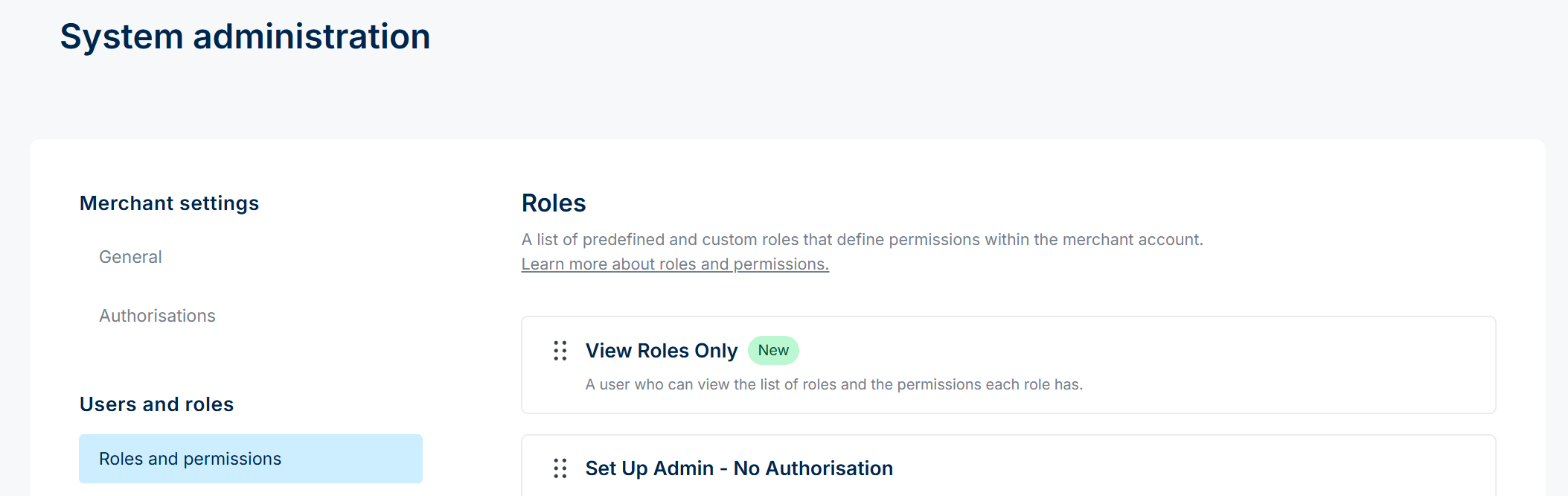
With the View roles permission enabled, users can view the list of roles available on the merchant and the permissions each role has.

Note:
- The only visible tab is roles and permissions when this permission is enabled.
- This permission being enabled does not mean that the user can see which roles specific users have; it only means that the user can view available roles and their permissions:
What happens when both permissions are enabled?

The View user list and View roles permissions need to both be enabled for users to be able to:
- View the table of users, their role and what accounts they have access to
- View the list of roles available on the merchant account
- View the permissions that are assigned to different roles

Role management: Create roles permission
With the Create roles permission enabled, users can create roles on the portal.
- Click here for a guide on how to create a role.
Note, the View roles permission must be enabled for this permission to be actionable:

Role management: Edit roles permission
With the Edit roles permission enabled, users can invite users to the merchant or they can edit roles - depending on the 'view' permission that's also enabled.
- Click here for a guide showing you how to invite users.
- Click here for a guide showing you how to edit a roles' permissions.
Note, at least one of the 'view' permissions need to be enabled for the edit permission to work.

Combining permissions
- If you enable the View user list + View roles + Edit roles permissions, then the user can:
- View the table of users, their role and what accounts they have access to
- View the list of roles available on the merchant account
- View the permissions that are assigned to different roles
- Edit permissions of a role
- Invite users to the merchant
- Edit a user's role and scope
- If you enable View user list + Edit roles, the user can:
- invite users to the merchant
- assign users to specific accounts ('scope')
- set their roles

- If you enable View roles + Edit roles , the user can:
- edit roles only
